Workflows
How to send monday.com files to Google Drive with a button
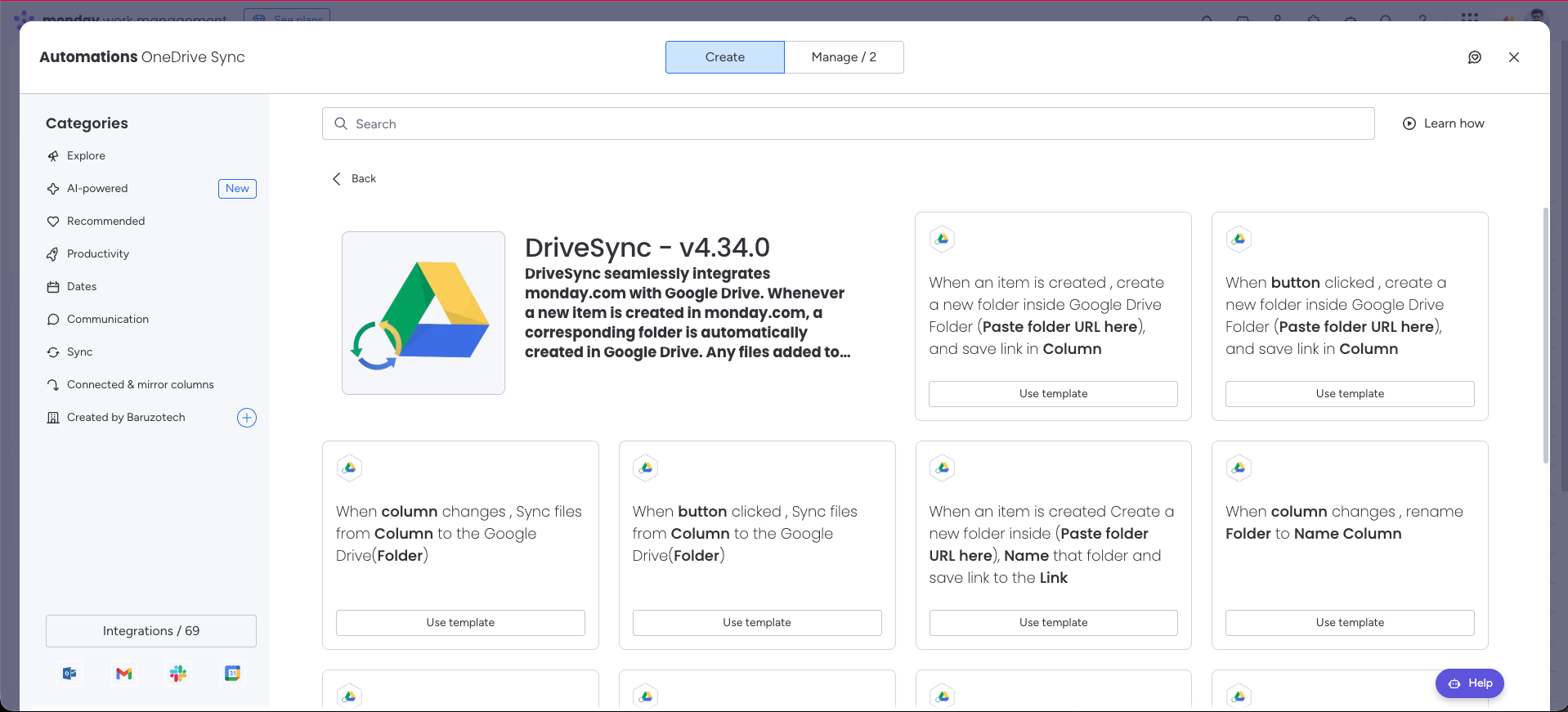
Use a Button column to copy files from one monday.com Files column into the item’s linked Google Drive folder when you are ready.
%0A%0A%23%23%20When%20to%20use%20this%20template%0A%0ALet%20a%20project%20manager%20copy%20approved%20deliverables%20when%20they%20are%20ready.%0A%0A%7C%20Trigger%20%7C%20Action%20%7C%0A%0A%7C%20---%20%7C%20---%20%7C%0A%0A%7C%20When%20a%20button%20is%20clicked%20%7C%20Sync%20files%20from%20a%20selected%20column%20to%20the%20Google%20Drive%20folder.%20%7C%0A%0A%23%23%20Configure%20the%20template%0A%0A1.%20Open%20your%20board%E2%80%99s%20Integrate%20area%20and%20find%20DriveSync.%0A%0A2.%20Select%20the%20template%20matching%20this%20trigger%20and%20action.%0A%0A3.%20Connect%20your%20accounts%20if%20prompted%2C%20then%20configure%20the%20fields%20below.%0A%0A4.%20Save%20the%20automation%20to%20your%20board.%0A%0A%7C%20Field%20%7C%20Configuration%20%7C%0A%0A%7C%20---%20%7C%20---%20%7C%0A%0A%7C%20Button%20%7C%20Select%20your%20sync%20Button%20column.%20%7C%0A%0A%7C%20Column%20%7C%20Select%20the%20source%20file%20column.%20%7C%0A%0A%7C%20Folder%20%7C%20Select%20the%20destination%20folder-link%20column.%20%7C%0A%0A%23%23%20Run%20a%20first%20test%0A%0AAdd%20a%20file%2C%20check%20the%20destination%20link%2C%20and%20click%20the%20configured%20button%20once.%0A%0A%3E%20Use%20a%20sample%20item%20and%20verify%20the%20result%20in%20Drive%20before%20applying%20the%20workflow%20across%20your%20board.%20Avoid%20overlapping%20automations%20that%20could%20start%20the%20same%20folder-creation%20action.%0A%0A%23%23%20Explore%20related%20workflows%0A%0A%5BAll%20automation%20templates%5D(https%3A%2F%2Fdrivesync.baruzotech.com%2Fdocs%2Ftemplates%2F)%0A%0A%5BBuild%20a%20custom%20automation%5D(https%3A%2F%2Fdrivesync.baruzotech.com%2Fdocs%2Fcustom-automations%2F)%0A%0ASupport%3A%20drivesync%40baruzotech.com) Ask ChatGPT
Ask ChatGPT%0A%0A%23%23%20When%20to%20use%20this%20template%0A%0ALet%20a%20project%20manager%20copy%20approved%20deliverables%20when%20they%20are%20ready.%0A%0A%7C%20Trigger%20%7C%20Action%20%7C%0A%0A%7C%20---%20%7C%20---%20%7C%0A%0A%7C%20When%20a%20button%20is%20clicked%20%7C%20Sync%20files%20from%20a%20selected%20column%20to%20the%20Google%20Drive%20folder.%20%7C%0A%0A%23%23%20Configure%20the%20template%0A%0A1.%20Open%20your%20board%E2%80%99s%20Integrate%20area%20and%20find%20DriveSync.%0A%0A2.%20Select%20the%20template%20matching%20this%20trigger%20and%20action.%0A%0A3.%20Connect%20your%20accounts%20if%20prompted%2C%20then%20configure%20the%20fields%20below.%0A%0A4.%20Save%20the%20automation%20to%20your%20board.%0A%0A%7C%20Field%20%7C%20Configuration%20%7C%0A%0A%7C%20---%20%7C%20---%20%7C%0A%0A%7C%20Button%20%7C%20Select%20your%20sync%20Button%20column.%20%7C%0A%0A%7C%20Column%20%7C%20Select%20the%20source%20file%20column.%20%7C%0A%0A%7C%20Folder%20%7C%20Select%20the%20destination%20folder-link%20column.%20%7C%0A%0A%23%23%20Run%20a%20first%20test%0A%0AAdd%20a%20file%2C%20check%20the%20destination%20link%2C%20and%20click%20the%20configured%20button%20once.%0A%0A%3E%20Use%20a%20sample%20item%20and%20verify%20the%20result%20in%20Drive%20before%20applying%20the%20workflow%20across%20your%20board.%20Avoid%20overlapping%20automations%20that%20could%20start%20the%20same%20folder-creation%20action.%0A%0A%23%23%20Explore%20related%20workflows%0A%0A%5BAll%20automation%20templates%5D(https%3A%2F%2Fdrivesync.baruzotech.com%2Fdocs%2Ftemplates%2F)%0A%0A%5BBuild%20a%20custom%20automation%5D(https%3A%2F%2Fdrivesync.baruzotech.com%2Fdocs%2Fcustom-automations%2F)%0A%0ASupport%3A%20drivesync%40baruzotech.com) Ask Claude
Ask ClaudeAutomation preview#
When to use this template#
Let a project manager copy approved deliverables when they are ready.
| Trigger | Action |
|---|---|
| When a button is clicked | Sync files from a selected column to the Google Drive folder. |
Configure the template#
- 1
Open your board’s Integrate area and find DriveSync.
- 2
Select the template matching this trigger and action.
- 3
Connect your accounts if prompted, then configure the fields below.
- 4
Save the automation to your board.
| Field | Configuration |
|---|---|
| Button | Select your sync Button column. |
| Column | Select the source file column. |
| Folder | Select the destination folder-link column. |
Run a first test#
Add a file, check the destination link, and click the configured button once.
Need a hand with your setup?Contact support