Getting started
How to manage your Google account and plan in DriveSync
Add the DriveSync Settings view to your monday.com board to connect or disconnect Google Drive, check your subscription, and open usage information.
%20beside%20the%20board%E2%80%99s%20view%20tabs%2C%20near%20Main%20table.%0A%0A3.%20Choose%20Apps%20in%20the%20Board%20views%20menu.%0A%0A4.%20Under%20Installed%2C%20choose%20DriveSync%20Settings.%20You%20can%20use%20the%20search%20box%20to%20find%20it.%0A%0A5.%20Open%20the%20new%20DriveSync%20Settings%20tab.%0A%0A%3E%20If%20DriveSync%20is%20not%20listed%20under%20Installed%2C%20check%20that%20the%20app%20is%20installed%20in%20this%20monday.com%20account.%0A%0A!%5Bmonday.com%20board%20view%20menu%20with%20Apps%20open%20and%20DriveSync%20Settings%20selected%20under%20Installed%5D(https%3A%2F%2Fdrivesync.baruzotech.com%2Fdocs-assets%2Fimages%2Fadd-drivesync-settings.png)%0A%0A%5BInstall%20and%20set%20up%20DriveSync%5D(https%3A%2F%2Fdrivesync.baruzotech.com%2Fdocs%2Fgetting-started%2F)%0A%0A%23%23%20Connect%20your%20Google%20Drive%20account%0A%0A1.%20Open%20the%20Settings%20tab%20in%20DriveSync%20Settings.%0A%0A2.%20Find%20the%20Google%20Account%20section.%20If%20no%20account%20is%20connected%2C%20it%20shows%20Not%20Connected.%0A%0A3.%20Click%20Connect%20Google%20Account.%0A%0A4.%20Sign%20in%20to%20the%20Google%20account%20you%20want%20DriveSync%20to%20use%20and%20review%20the%20requested%20permissions.%0A%0A5.%20Return%20to%20the%20settings%20view%20and%20verify%20the%20connection.%20Check%20that%20this%20Google%20account%20can%20access%20the%20folders%20your%20automations%20use.%0A%0A!%5BDriveSync%20Settings%20showing%20the%20Google%20Account%20connection%20status%2C%20Connect%20Google%20Account%20button%2C%20and%20Current%20Subscription%20section%5D(https%3A%2F%2Fdrivesync.baruzotech.com%2Fdocs-assets%2Fimages%2Fdrivesync-settings-account-plan.png)%0A%0A%5BTroubleshoot%20Google%20sign-in%5D(https%3A%2F%2Fdrivesync.baruzotech.com%2Fdocs%2Fconnect-google-account%2F)%0A%0A%5BCheck%20Google%20Drive%20folder%20permissions%5D(https%3A%2F%2Fdrivesync.baruzotech.com%2Fdocs%2Fgoogle-drive-permissions%2F)%0A%0A%23%23%20Disconnect%20or%20change%20your%20Google%20account%0A%0AUse%20the%20Google%20Account%20section%20in%20DriveSync%20Settings%20to%20disconnect%20the%20connected%20account.%20If%20you%20want%20to%20use%20a%20different%20Google%20account%2C%20connect%20that%20account%20after%20disconnecting%20the%20current%20one.%0A%0A1.%20Review%20which%20automations%20rely%20on%20the%20current%20Google%20connection.%0A%0A2.%20Open%20Settings%20and%20disconnect%20the%20account%20in%20the%20Google%20Account%20section.%0A%0A3.%20To%20switch%20accounts%2C%20click%20Connect%20Google%20Account%20and%20sign%20in%20with%20the%20intended%20account.%0A%0A4.%20Verify%20that%20the%20new%20account%20has%20access%20to%20the%20required%20Drive%20folders%2C%20then%20review%20the%20connection%20selected%20in%20your%20automations.%0A%0A5.%20Test%20one%20folder%20creation%20or%20file-sync%20action.%0A%0A%3E%20Automations%20that%20depend%20on%20the%20disconnected%20account%20need%20a%20working%20connection%20to%20perform%20Google%20Drive%20actions.%20Disconnecting%20Google%20is%20separate%20from%20cancelling%20your%20DriveSync%20subscription.%0A%0A%5BFix%20a%20disconnected%20Google%20account%5D(https%3A%2F%2Fdrivesync.baruzotech.com%2Fdocs%2Fgoogle-account-disconnected%2F)%0A%0A%23%23%20Check%20your%20current%20plan%0A%0AOn%20the%20Settings%20tab%2C%20scroll%20to%20Current%20Subscription.%20This%20section%20displays%20your%20plan%20and%20subscription%20information.%0A%0A-%20Plan%20name%20and%20billing%20period.%0A%0A-%20Maximum%20users%20and%20renewal%20information%20shown%20for%20the%20account.%0A%0A-%20Trial%20status%20and%20remaining%20time%20when%20applicable.%0A%0A%3E%20Use%20the%20values%20in%20your%20own%20account.%20The%20screenshot%20is%20an%20example%2C%20not%20a%20statement%20of%20available%20plans%2C%20trial%20length%2C%20or%20user%20limits.%0A%0A%5BInvoices%20and%20cancellation%5D(https%3A%2F%2Fdrivesync.baruzotech.com%2Fdocs%2Fbilling-and-cancellation%2F)%0A%0A%5BPaid%20but%20still%20blocked%3F%5D(https%3A%2F%2Fdrivesync.baruzotech.com%2Fdocs%2Fpayment-error-after-paying%2F)%0A%0A%23%23%20Open%20plan%20upgrades%20and%20usage%0A%0ASelect%20Upgrade%20Plan%20in%20Current%20Subscription%20to%20open%20the%20upgrade%20flow.%20Review%20the%20available%20plan%20and%20billing%20details%20before%20confirming%20a%20purchase.%0A%0ASelect%20the%20Usage%20tab%20at%20the%20top%20of%20DriveSync%20Settings%20to%20check%20the%20usage%20information%20available%20for%20your%20account.%20The%20view%20also%20has%20Other%20Apps%20and%20Rate%20Us%20tabs.%0A%0A%23%23%20Settings%20or%20the%20Google%20Drive%20item%20view%3F%0A%0AUse%20DriveSync%20Settings%20to%20manage%20the%20connection%20and%20check%20the%20subscription%20at%20board%20level.%20Use%20the%20Google%20Drive%20item%20view%20to%20browse%20the%20folder%20linked%20to%20an%20individual%20item.%0A%0A%5BView%20Google%20Drive%20files%20inside%20an%20item%5D(https%3A%2F%2Fdrivesync.baruzotech.com%2Fdocs%2Fitem-view%2F)%0A%0A%23%23%20Common%20questions%0A%0A%23%23%23%20Where%20do%20I%20find%20DriveSync%20Settings%20in%20monday.com%3F%0A%0AOn%20your%20board%2C%20click%20the%20plus%20beside%20the%20view%20tabs%2C%20choose%20Apps%2C%20and%20select%20DriveSync%20Settings%20under%20Installed.%20Once%20added%2C%20open%20it%20from%20the%20board%E2%80%99s%20view%20tabs.%0A%0A%23%23%23%20Does%20disconnecting%20Google%20cancel%20my%20DriveSync%20plan%3F%0A%0ANo.%20The%20Google%20connection%20and%20the%20app%20subscription%20are%20separate.%20Manage%20subscription%20cancellation%20through%20DriveSync%E2%80%99s%20billing%20controls%20in%20the%20monday.com%20marketplace.%0A%0ASupport%3A%20drivesync%40baruzotech.com) Ask ChatGPT
Ask ChatGPT%20beside%20the%20board%E2%80%99s%20view%20tabs%2C%20near%20Main%20table.%0A%0A3.%20Choose%20Apps%20in%20the%20Board%20views%20menu.%0A%0A4.%20Under%20Installed%2C%20choose%20DriveSync%20Settings.%20You%20can%20use%20the%20search%20box%20to%20find%20it.%0A%0A5.%20Open%20the%20new%20DriveSync%20Settings%20tab.%0A%0A%3E%20If%20DriveSync%20is%20not%20listed%20under%20Installed%2C%20check%20that%20the%20app%20is%20installed%20in%20this%20monday.com%20account.%0A%0A!%5Bmonday.com%20board%20view%20menu%20with%20Apps%20open%20and%20DriveSync%20Settings%20selected%20under%20Installed%5D(https%3A%2F%2Fdrivesync.baruzotech.com%2Fdocs-assets%2Fimages%2Fadd-drivesync-settings.png)%0A%0A%5BInstall%20and%20set%20up%20DriveSync%5D(https%3A%2F%2Fdrivesync.baruzotech.com%2Fdocs%2Fgetting-started%2F)%0A%0A%23%23%20Connect%20your%20Google%20Drive%20account%0A%0A1.%20Open%20the%20Settings%20tab%20in%20DriveSync%20Settings.%0A%0A2.%20Find%20the%20Google%20Account%20section.%20If%20no%20account%20is%20connected%2C%20it%20shows%20Not%20Connected.%0A%0A3.%20Click%20Connect%20Google%20Account.%0A%0A4.%20Sign%20in%20to%20the%20Google%20account%20you%20want%20DriveSync%20to%20use%20and%20review%20the%20requested%20permissions.%0A%0A5.%20Return%20to%20the%20settings%20view%20and%20verify%20the%20connection.%20Check%20that%20this%20Google%20account%20can%20access%20the%20folders%20your%20automations%20use.%0A%0A!%5BDriveSync%20Settings%20showing%20the%20Google%20Account%20connection%20status%2C%20Connect%20Google%20Account%20button%2C%20and%20Current%20Subscription%20section%5D(https%3A%2F%2Fdrivesync.baruzotech.com%2Fdocs-assets%2Fimages%2Fdrivesync-settings-account-plan.png)%0A%0A%5BTroubleshoot%20Google%20sign-in%5D(https%3A%2F%2Fdrivesync.baruzotech.com%2Fdocs%2Fconnect-google-account%2F)%0A%0A%5BCheck%20Google%20Drive%20folder%20permissions%5D(https%3A%2F%2Fdrivesync.baruzotech.com%2Fdocs%2Fgoogle-drive-permissions%2F)%0A%0A%23%23%20Disconnect%20or%20change%20your%20Google%20account%0A%0AUse%20the%20Google%20Account%20section%20in%20DriveSync%20Settings%20to%20disconnect%20the%20connected%20account.%20If%20you%20want%20to%20use%20a%20different%20Google%20account%2C%20connect%20that%20account%20after%20disconnecting%20the%20current%20one.%0A%0A1.%20Review%20which%20automations%20rely%20on%20the%20current%20Google%20connection.%0A%0A2.%20Open%20Settings%20and%20disconnect%20the%20account%20in%20the%20Google%20Account%20section.%0A%0A3.%20To%20switch%20accounts%2C%20click%20Connect%20Google%20Account%20and%20sign%20in%20with%20the%20intended%20account.%0A%0A4.%20Verify%20that%20the%20new%20account%20has%20access%20to%20the%20required%20Drive%20folders%2C%20then%20review%20the%20connection%20selected%20in%20your%20automations.%0A%0A5.%20Test%20one%20folder%20creation%20or%20file-sync%20action.%0A%0A%3E%20Automations%20that%20depend%20on%20the%20disconnected%20account%20need%20a%20working%20connection%20to%20perform%20Google%20Drive%20actions.%20Disconnecting%20Google%20is%20separate%20from%20cancelling%20your%20DriveSync%20subscription.%0A%0A%5BFix%20a%20disconnected%20Google%20account%5D(https%3A%2F%2Fdrivesync.baruzotech.com%2Fdocs%2Fgoogle-account-disconnected%2F)%0A%0A%23%23%20Check%20your%20current%20plan%0A%0AOn%20the%20Settings%20tab%2C%20scroll%20to%20Current%20Subscription.%20This%20section%20displays%20your%20plan%20and%20subscription%20information.%0A%0A-%20Plan%20name%20and%20billing%20period.%0A%0A-%20Maximum%20users%20and%20renewal%20information%20shown%20for%20the%20account.%0A%0A-%20Trial%20status%20and%20remaining%20time%20when%20applicable.%0A%0A%3E%20Use%20the%20values%20in%20your%20own%20account.%20The%20screenshot%20is%20an%20example%2C%20not%20a%20statement%20of%20available%20plans%2C%20trial%20length%2C%20or%20user%20limits.%0A%0A%5BInvoices%20and%20cancellation%5D(https%3A%2F%2Fdrivesync.baruzotech.com%2Fdocs%2Fbilling-and-cancellation%2F)%0A%0A%5BPaid%20but%20still%20blocked%3F%5D(https%3A%2F%2Fdrivesync.baruzotech.com%2Fdocs%2Fpayment-error-after-paying%2F)%0A%0A%23%23%20Open%20plan%20upgrades%20and%20usage%0A%0ASelect%20Upgrade%20Plan%20in%20Current%20Subscription%20to%20open%20the%20upgrade%20flow.%20Review%20the%20available%20plan%20and%20billing%20details%20before%20confirming%20a%20purchase.%0A%0ASelect%20the%20Usage%20tab%20at%20the%20top%20of%20DriveSync%20Settings%20to%20check%20the%20usage%20information%20available%20for%20your%20account.%20The%20view%20also%20has%20Other%20Apps%20and%20Rate%20Us%20tabs.%0A%0A%23%23%20Settings%20or%20the%20Google%20Drive%20item%20view%3F%0A%0AUse%20DriveSync%20Settings%20to%20manage%20the%20connection%20and%20check%20the%20subscription%20at%20board%20level.%20Use%20the%20Google%20Drive%20item%20view%20to%20browse%20the%20folder%20linked%20to%20an%20individual%20item.%0A%0A%5BView%20Google%20Drive%20files%20inside%20an%20item%5D(https%3A%2F%2Fdrivesync.baruzotech.com%2Fdocs%2Fitem-view%2F)%0A%0A%23%23%20Common%20questions%0A%0A%23%23%23%20Where%20do%20I%20find%20DriveSync%20Settings%20in%20monday.com%3F%0A%0AOn%20your%20board%2C%20click%20the%20plus%20beside%20the%20view%20tabs%2C%20choose%20Apps%2C%20and%20select%20DriveSync%20Settings%20under%20Installed.%20Once%20added%2C%20open%20it%20from%20the%20board%E2%80%99s%20view%20tabs.%0A%0A%23%23%23%20Does%20disconnecting%20Google%20cancel%20my%20DriveSync%20plan%3F%0A%0ANo.%20The%20Google%20connection%20and%20the%20app%20subscription%20are%20separate.%20Manage%20subscription%20cancellation%20through%20DriveSync%E2%80%99s%20billing%20controls%20in%20the%20monday.com%20marketplace.%0A%0ASupport%3A%20drivesync%40baruzotech.com) Ask Claude
Ask ClaudeAdd the DriveSync Settings view#
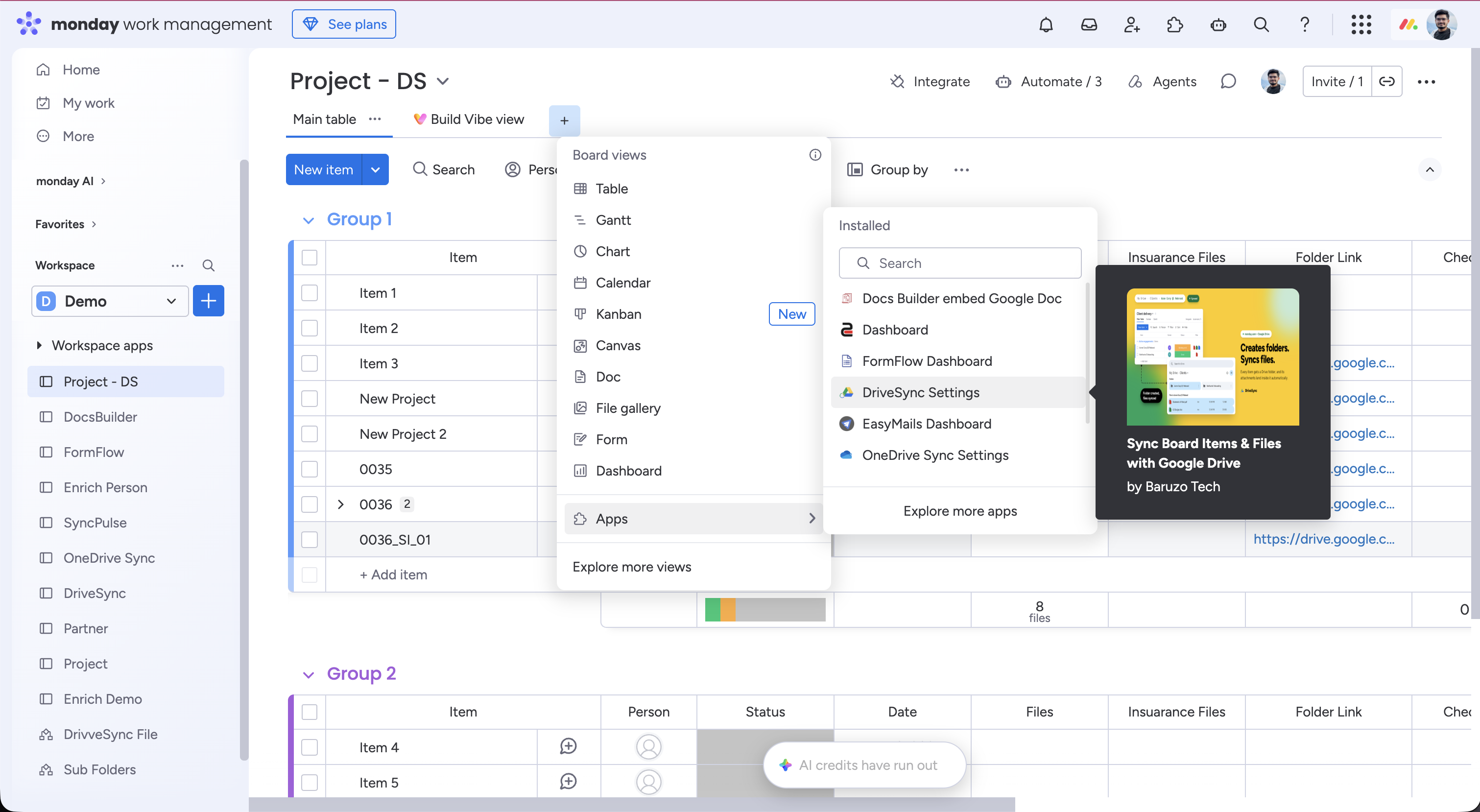
DriveSync Settings is a board view for managing your Google connection and reviewing your app subscription. Add it to a board where you use DriveSync.
- 1
Open your monday.com board.
- 2
Click the plus (+) beside the board’s view tabs, near Main table.
- 3
Choose Apps in the Board views menu.
- 4
Under Installed, choose DriveSync Settings. You can use the search box to find it.
- 5
Open the new DriveSync Settings tab.
Connect your Google Drive account#
- 1
Open the Settings tab in DriveSync Settings.
- 2
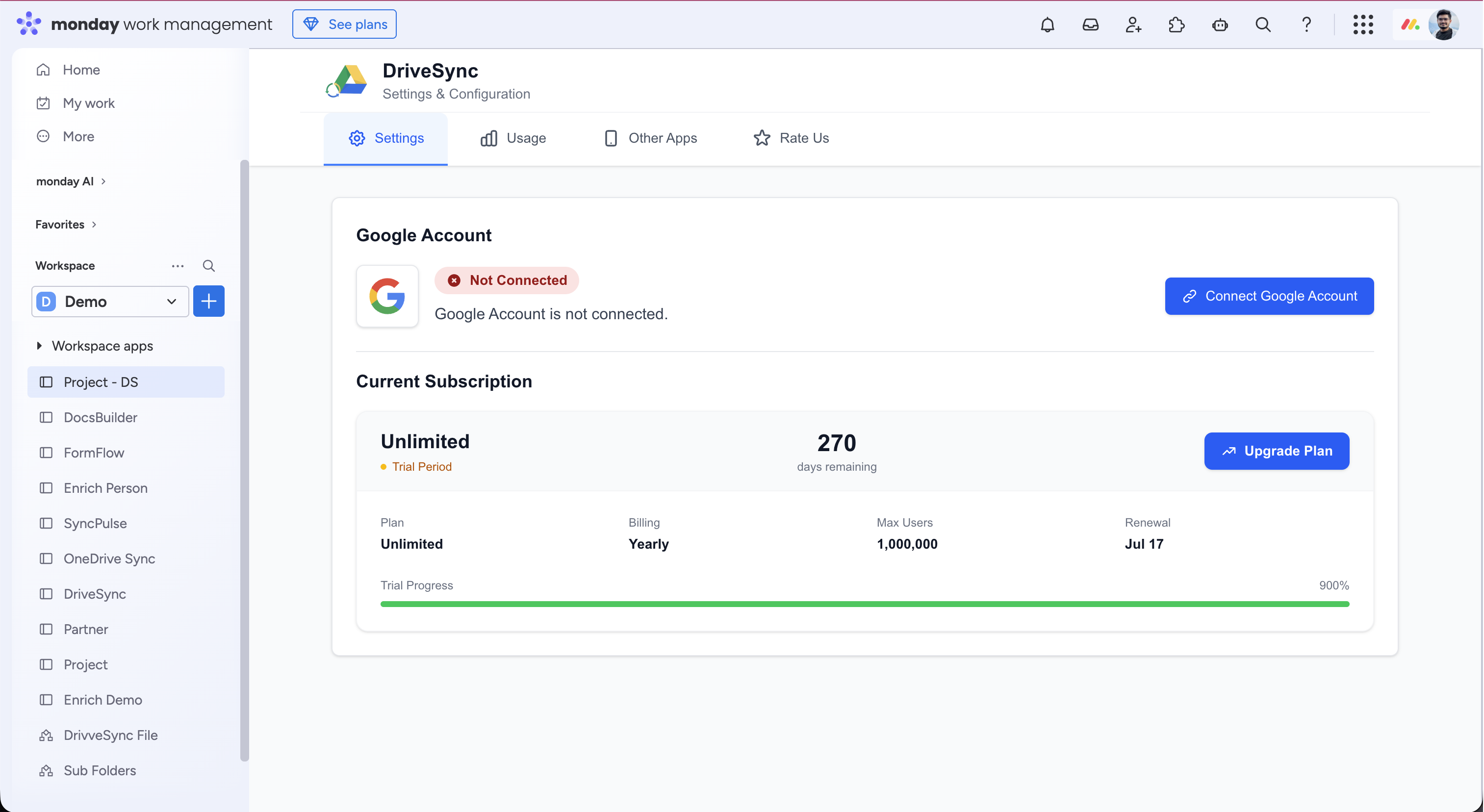
Find the Google Account section. If no account is connected, it shows Not Connected.
- 3
Click Connect Google Account.
- 4
Sign in to the Google account you want DriveSync to use and review the requested permissions.
- 5
Return to the settings view and verify the connection. Check that this Google account can access the folders your automations use.
Disconnect or change your Google account#
Use the Google Account section in DriveSync Settings to disconnect the connected account. If you want to use a different Google account, connect that account after disconnecting the current one.
- 1
Review which automations rely on the current Google connection.
- 2
Open Settings and disconnect the account in the Google Account section.
- 3
To switch accounts, click Connect Google Account and sign in with the intended account.
- 4
Verify that the new account has access to the required Drive folders, then review the connection selected in your automations.
- 5
Test one folder creation or file-sync action.
Check your current plan#
On the Settings tab, scroll to Current Subscription. This section displays your plan and subscription information.
- Plan name and billing period.
- Maximum users and renewal information shown for the account.
- Trial status and remaining time when applicable.
Open plan upgrades and usage#
Select Upgrade Plan in Current Subscription to open the upgrade flow. Review the available plan and billing details before confirming a purchase.
Select the Usage tab at the top of DriveSync Settings to check the usage information available for your account. The view also has Other Apps and Rate Us tabs.
Settings or the Google Drive item view?#
Use DriveSync Settings to manage the connection and check the subscription at board level. Use the Google Drive item view to browse the folder linked to an individual item.
Common questions
Where do I find DriveSync Settings in monday.com?
On your board, click the plus beside the view tabs, choose Apps, and select DriveSync Settings under Installed. Once added, open it from the board’s view tabs.
Does disconnecting Google cancel my DriveSync plan?
No. The Google connection and the app subscription are separate. Manage subscription cancellation through DriveSync’s billing controls in the monday.com marketplace.