Workflows
How to rename a Google Drive folder when a monday.com item name changes
Use an item-name-change trigger to rename a folder created by DriveSync. Choose the folder link and the name column the automation should read.
%0A%0A%23%23%20When%20to%20use%20this%20template%0A%0AKeep%20folder%20naming%20aligned%20with%20your%20board%E2%80%99s%20project%20naming%20process.%0A%0A%7C%20Trigger%20%7C%20Action%20%7C%0A%0A%7C%20---%20%7C%20---%20%7C%0A%0A%7C%20When%20the%20item%20name%20changes%20%7C%20Rename%20a%20folder%20created%20by%20DriveSync%20using%20Name%20Column.%20%7C%0A%0A%23%23%20Configure%20the%20template%0A%0A1.%20Open%20your%20board%E2%80%99s%20Integrate%20area%20and%20find%20DriveSync.%0A%0A2.%20Select%20the%20template%20matching%20this%20trigger%20and%20action.%0A%0A3.%20Connect%20your%20accounts%20if%20prompted%2C%20then%20configure%20the%20fields%20below.%0A%0A4.%20Save%20the%20automation%20to%20your%20board.%0A%0A%7C%20Field%20%7C%20Configuration%20%7C%0A%0A%7C%20---%20%7C%20---%20%7C%0A%0A%7C%20Folder%20%7C%20Choose%20the%20column%20containing%20the%20folder%20link.%20%7C%0A%0A%7C%20Name%20Column%20%7C%20Choose%20the%20column%20whose%20value%20will%20become%20the%20folder%20name.%20%7C%0A%0A%23%23%20Run%20a%20first%20test%0A%0AChange%20a%20test%20item%E2%80%99s%20name%20and%20verify%20the%20Drive%20folder%20name.%20The%20trigger%20and%20naming%20source%20are%20separate%20settings.%0A%0A%3E%20Use%20a%20sample%20item%20and%20verify%20the%20result%20in%20Drive%20before%20applying%20the%20workflow%20across%20your%20board.%20Avoid%20overlapping%20automations%20that%20could%20start%20the%20same%20folder-creation%20action.%0A%0A%23%23%20Explore%20related%20workflows%0A%0A%5BAll%20automation%20templates%5D(https%3A%2F%2Fdrivesync.baruzotech.com%2Fdocs%2Ftemplates%2F)%0A%0A%5BBuild%20a%20custom%20automation%5D(https%3A%2F%2Fdrivesync.baruzotech.com%2Fdocs%2Fcustom-automations%2F)%0A%0A%23%23%20Common%20questions%0A%0A%23%23%23%20Does%20the%20item%20name%20automatically%20become%20the%20new%20folder%20name%3F%0A%0AThe%20item-name%20change%20starts%20the%20action%2C%20but%20the%20selected%20Name%20Column%20supplies%20the%20new%20folder%20name.%20Check%20both%20settings%20and%20test%20one%20item%20to%20confirm%20the%20result%20you%20want.%0A%0ASupport%3A%20drivesync%40baruzotech.com) Ask ChatGPT
Ask ChatGPT%0A%0A%23%23%20When%20to%20use%20this%20template%0A%0AKeep%20folder%20naming%20aligned%20with%20your%20board%E2%80%99s%20project%20naming%20process.%0A%0A%7C%20Trigger%20%7C%20Action%20%7C%0A%0A%7C%20---%20%7C%20---%20%7C%0A%0A%7C%20When%20the%20item%20name%20changes%20%7C%20Rename%20a%20folder%20created%20by%20DriveSync%20using%20Name%20Column.%20%7C%0A%0A%23%23%20Configure%20the%20template%0A%0A1.%20Open%20your%20board%E2%80%99s%20Integrate%20area%20and%20find%20DriveSync.%0A%0A2.%20Select%20the%20template%20matching%20this%20trigger%20and%20action.%0A%0A3.%20Connect%20your%20accounts%20if%20prompted%2C%20then%20configure%20the%20fields%20below.%0A%0A4.%20Save%20the%20automation%20to%20your%20board.%0A%0A%7C%20Field%20%7C%20Configuration%20%7C%0A%0A%7C%20---%20%7C%20---%20%7C%0A%0A%7C%20Folder%20%7C%20Choose%20the%20column%20containing%20the%20folder%20link.%20%7C%0A%0A%7C%20Name%20Column%20%7C%20Choose%20the%20column%20whose%20value%20will%20become%20the%20folder%20name.%20%7C%0A%0A%23%23%20Run%20a%20first%20test%0A%0AChange%20a%20test%20item%E2%80%99s%20name%20and%20verify%20the%20Drive%20folder%20name.%20The%20trigger%20and%20naming%20source%20are%20separate%20settings.%0A%0A%3E%20Use%20a%20sample%20item%20and%20verify%20the%20result%20in%20Drive%20before%20applying%20the%20workflow%20across%20your%20board.%20Avoid%20overlapping%20automations%20that%20could%20start%20the%20same%20folder-creation%20action.%0A%0A%23%23%20Explore%20related%20workflows%0A%0A%5BAll%20automation%20templates%5D(https%3A%2F%2Fdrivesync.baruzotech.com%2Fdocs%2Ftemplates%2F)%0A%0A%5BBuild%20a%20custom%20automation%5D(https%3A%2F%2Fdrivesync.baruzotech.com%2Fdocs%2Fcustom-automations%2F)%0A%0A%23%23%20Common%20questions%0A%0A%23%23%23%20Does%20the%20item%20name%20automatically%20become%20the%20new%20folder%20name%3F%0A%0AThe%20item-name%20change%20starts%20the%20action%2C%20but%20the%20selected%20Name%20Column%20supplies%20the%20new%20folder%20name.%20Check%20both%20settings%20and%20test%20one%20item%20to%20confirm%20the%20result%20you%20want.%0A%0ASupport%3A%20drivesync%40baruzotech.com) Ask Claude
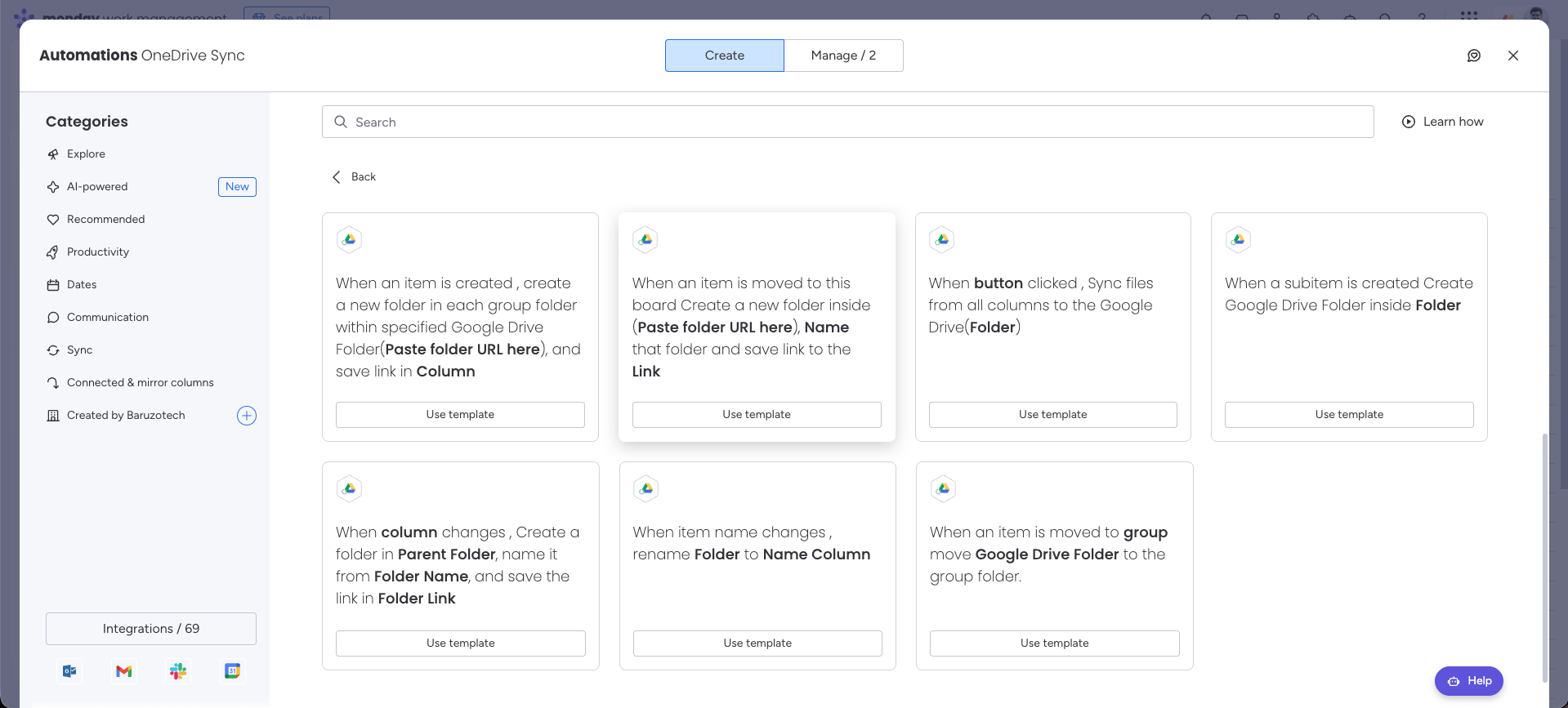
Ask ClaudeAutomation preview#
When to use this template#
Keep folder naming aligned with your board’s project naming process.
| Trigger | Action |
|---|---|
| When the item name changes | Rename a folder created by DriveSync using Name Column. |
Configure the template#
- 1
Open your board’s Integrate area and find DriveSync.
- 2
Select the template matching this trigger and action.
- 3
Connect your accounts if prompted, then configure the fields below.
- 4
Save the automation to your board.
| Field | Configuration |
|---|---|
| Folder | Choose the column containing the folder link. |
| Name Column | Choose the column whose value will become the folder name. |
Run a first test#
Change a test item’s name and verify the Drive folder name. The trigger and naming source are separate settings.
Common questions
Does the item name automatically become the new folder name?
The item-name change starts the action, but the selected Name Column supplies the new folder name. Check both settings and test one item to confirm the result you want.
Need a hand with your setup?Contact support