Workflows
How to create a Google Drive folder with a button in monday.com
Add a Button column and a DriveSync folder-creation automation so you can create an item’s Google Drive folder when you need it.
%0A%0A%23%23%20When%20to%20use%20this%20template%0A%0ACreate%20folders%20for%20existing%20items%20without%20recreating%20your%20board.%0A%0A%7C%20Trigger%20%7C%20Action%20%7C%0A%0A%7C%20---%20%7C%20---%20%7C%0A%0A%7C%20When%20a%20button%20is%20clicked%20%7C%20Create%20a%20new%20folder%20inside%20a%20Google%20Drive%20folder%20and%20save%20its%20link%20in%20a%20column.%20%7C%0A%0A%23%23%20Configure%20the%20template%0A%0A1.%20Open%20your%20board%E2%80%99s%20Integrate%20area%20and%20find%20DriveSync.%0A%0A2.%20Select%20the%20template%20matching%20this%20trigger%20and%20action.%0A%0A3.%20Connect%20your%20accounts%20if%20prompted%2C%20then%20configure%20the%20fields%20below.%0A%0A4.%20Save%20the%20automation%20to%20your%20board.%0A%0A%7C%20Field%20%7C%20Configuration%20%7C%0A%0A%7C%20---%20%7C%20---%20%7C%0A%0A%7C%20Button%20%7C%20Choose%20the%20Button%20column%20that%20starts%20folder%20creation.%20%7C%0A%0A%7C%20Parent%20folder%20URL%20%7C%20Paste%20the%20Google%20Drive%20destination%20folder%20URL.%20%7C%0A%0A%7C%20Column%20%7C%20Choose%20the%20Link%20column%20for%20the%20new%20folder.%20%7C%0A%0A%23%23%20Run%20a%20first%20test%0A%0AClick%20the%20button%20on%20one%20existing%20item%20and%20open%20the%20resulting%20folder%20link.%0A%0A%3E%20Use%20a%20sample%20item%20and%20verify%20the%20result%20in%20Drive%20before%20applying%20the%20workflow%20across%20your%20board.%20Avoid%20overlapping%20automations%20that%20could%20start%20the%20same%20folder-creation%20action.%0A%0A%23%23%20Explore%20related%20workflows%0A%0A%5BAll%20automation%20templates%5D(https%3A%2F%2Fdrivesync.baruzotech.com%2Fdocs%2Ftemplates%2F)%0A%0A%5BBuild%20a%20custom%20automation%5D(https%3A%2F%2Fdrivesync.baruzotech.com%2Fdocs%2Fcustom-automations%2F)%0A%0A%23%23%20Common%20questions%0A%0A%23%23%23%20Can%20I%20create%20a%20folder%20for%20an%20existing%20monday.com%20item%3F%0A%0AYes.%20Add%20the%20button%20automation%20to%20your%20board%20and%20click%20the%20configured%20button%20on%20that%20item.%20Check%20the%20new%20folder%20and%20saved%20link%20before%20using%20it%20on%20other%20items.%0A%0ASupport%3A%20drivesync%40baruzotech.com) Ask ChatGPT
Ask ChatGPT%0A%0A%23%23%20When%20to%20use%20this%20template%0A%0ACreate%20folders%20for%20existing%20items%20without%20recreating%20your%20board.%0A%0A%7C%20Trigger%20%7C%20Action%20%7C%0A%0A%7C%20---%20%7C%20---%20%7C%0A%0A%7C%20When%20a%20button%20is%20clicked%20%7C%20Create%20a%20new%20folder%20inside%20a%20Google%20Drive%20folder%20and%20save%20its%20link%20in%20a%20column.%20%7C%0A%0A%23%23%20Configure%20the%20template%0A%0A1.%20Open%20your%20board%E2%80%99s%20Integrate%20area%20and%20find%20DriveSync.%0A%0A2.%20Select%20the%20template%20matching%20this%20trigger%20and%20action.%0A%0A3.%20Connect%20your%20accounts%20if%20prompted%2C%20then%20configure%20the%20fields%20below.%0A%0A4.%20Save%20the%20automation%20to%20your%20board.%0A%0A%7C%20Field%20%7C%20Configuration%20%7C%0A%0A%7C%20---%20%7C%20---%20%7C%0A%0A%7C%20Button%20%7C%20Choose%20the%20Button%20column%20that%20starts%20folder%20creation.%20%7C%0A%0A%7C%20Parent%20folder%20URL%20%7C%20Paste%20the%20Google%20Drive%20destination%20folder%20URL.%20%7C%0A%0A%7C%20Column%20%7C%20Choose%20the%20Link%20column%20for%20the%20new%20folder.%20%7C%0A%0A%23%23%20Run%20a%20first%20test%0A%0AClick%20the%20button%20on%20one%20existing%20item%20and%20open%20the%20resulting%20folder%20link.%0A%0A%3E%20Use%20a%20sample%20item%20and%20verify%20the%20result%20in%20Drive%20before%20applying%20the%20workflow%20across%20your%20board.%20Avoid%20overlapping%20automations%20that%20could%20start%20the%20same%20folder-creation%20action.%0A%0A%23%23%20Explore%20related%20workflows%0A%0A%5BAll%20automation%20templates%5D(https%3A%2F%2Fdrivesync.baruzotech.com%2Fdocs%2Ftemplates%2F)%0A%0A%5BBuild%20a%20custom%20automation%5D(https%3A%2F%2Fdrivesync.baruzotech.com%2Fdocs%2Fcustom-automations%2F)%0A%0A%23%23%20Common%20questions%0A%0A%23%23%23%20Can%20I%20create%20a%20folder%20for%20an%20existing%20monday.com%20item%3F%0A%0AYes.%20Add%20the%20button%20automation%20to%20your%20board%20and%20click%20the%20configured%20button%20on%20that%20item.%20Check%20the%20new%20folder%20and%20saved%20link%20before%20using%20it%20on%20other%20items.%0A%0ASupport%3A%20drivesync%40baruzotech.com) Ask Claude
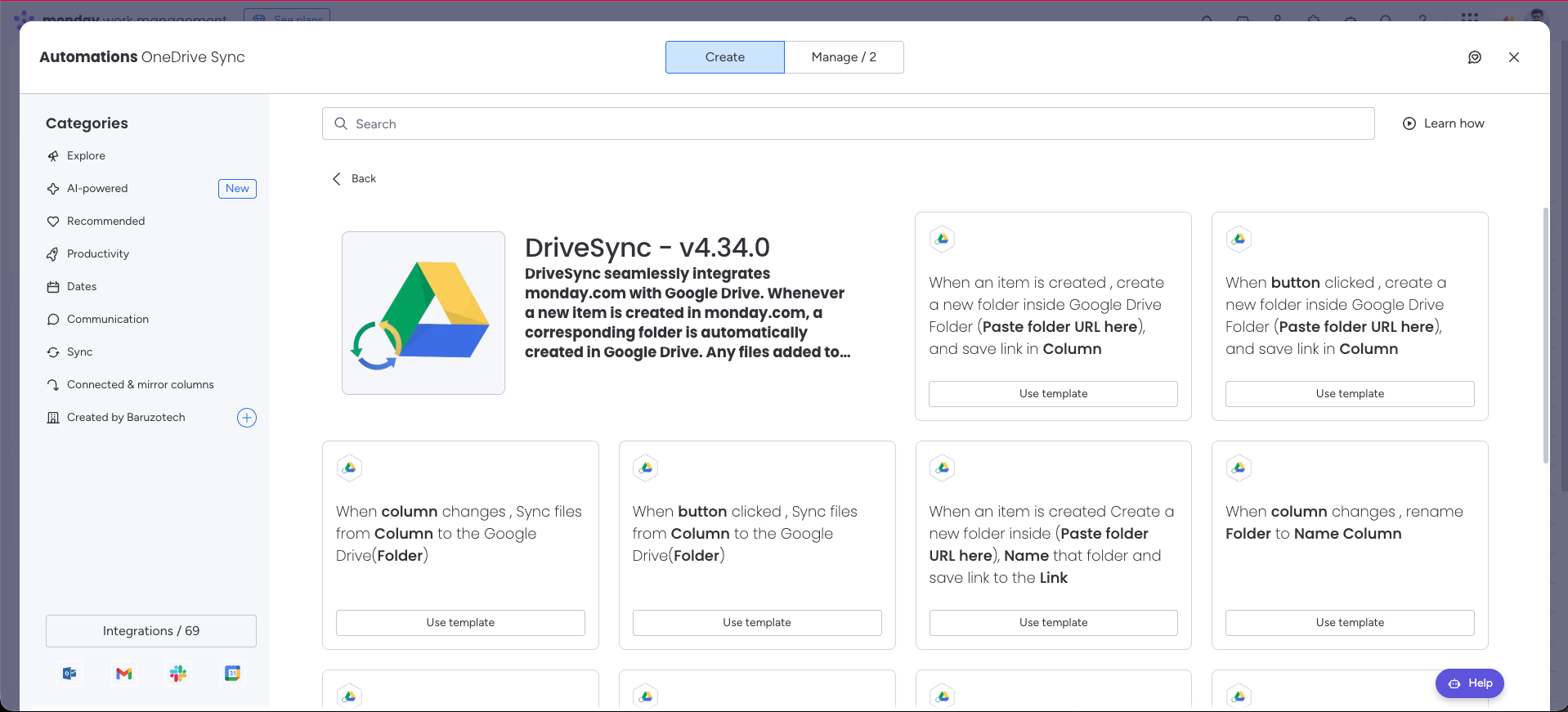
Ask ClaudeAutomation preview#
When to use this template#
Create folders for existing items without recreating your board.
| Trigger | Action |
|---|---|
| When a button is clicked | Create a new folder inside a Google Drive folder and save its link in a column. |
Configure the template#
- 1
Open your board’s Integrate area and find DriveSync.
- 2
Select the template matching this trigger and action.
- 3
Connect your accounts if prompted, then configure the fields below.
- 4
Save the automation to your board.
| Field | Configuration |
|---|---|
| Button | Choose the Button column that starts folder creation. |
| Parent folder URL | Paste the Google Drive destination folder URL. |
| Column | Choose the Link column for the new folder. |
Run a first test#
Click the button on one existing item and open the resulting folder link.
Common questions
Can I create a folder for an existing monday.com item?
Yes. Add the button automation to your board and click the configured button on that item. Check the new folder and saved link before using it on other items.
Need a hand with your setup?Contact support